Why Your Website Pages Are Discovered but Not Indexed by Google
You publish a new page, add it to your sitemap, and wait for it to appear on Google.
Days later, you open Google Search Console and find this status:
Discovered - currently not indexed.
Google knows the URL exists, but the page is still missing from Google's index.
This can be frustrating, especially when the page contains important service, product, or blog content.
The good news is that this status does not automatically mean your website has received a penalty or that the page will never be indexed.
However, if important URLs remain in this state for a long time, you should investigate your website's crawlability, internal linking, content quality, server performance, sitemap, and overall technical SEO health.
In this guide, we'll explain what 'Discovered - currently not indexed' means, why it happens, and what you can do to improve your chances of getting important pages crawled and indexed.
What Does 'Discovered - Currently Not Indexed' Mean?
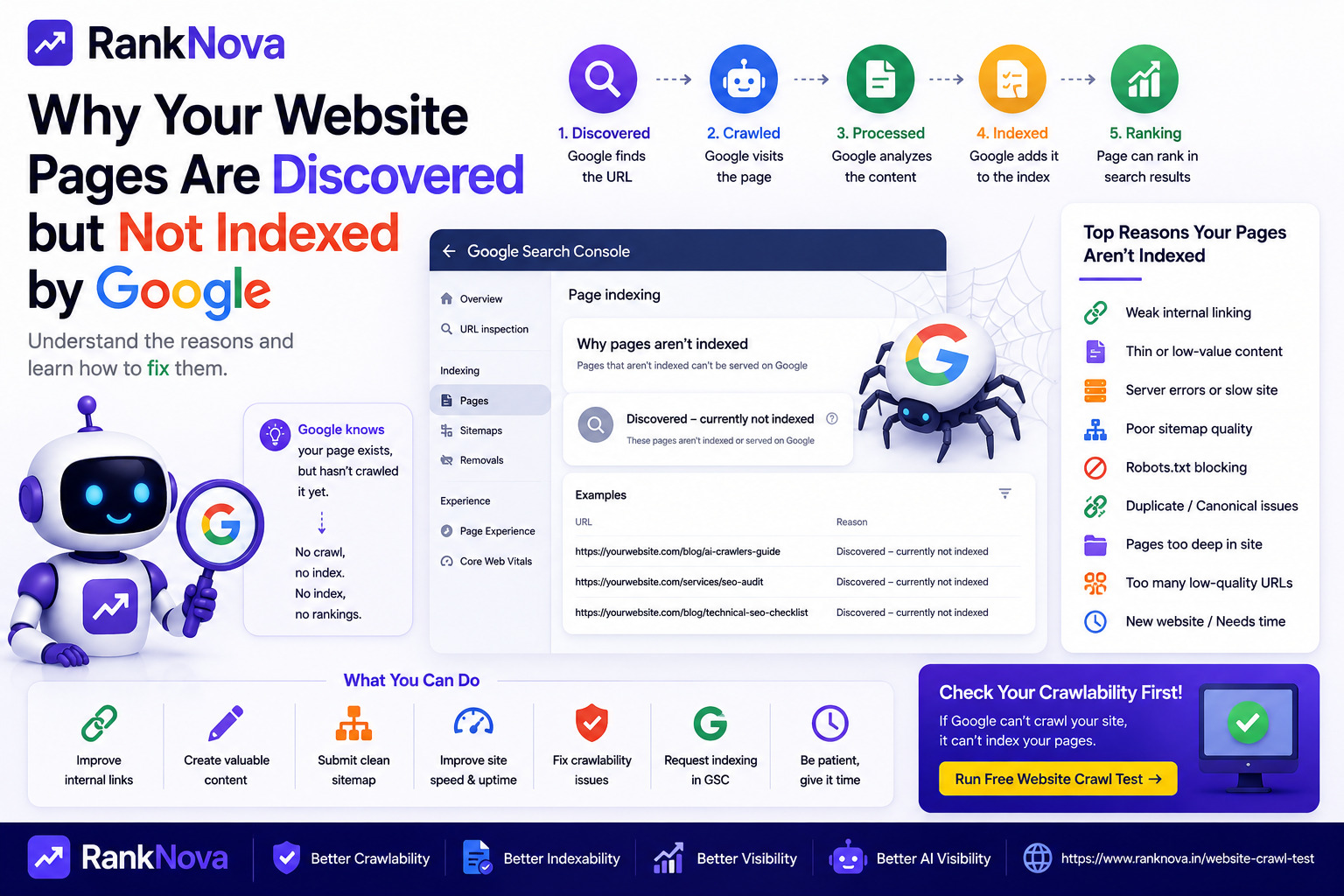
When Google reports a URL as Discovered - currently not indexed, it generally means Google knows the URL exists but has not yet crawled it.
Google may discover a URL through several sources, including:
- XML sitemaps
- Internal links
- External links
- Previously known URLs
- Redirects
- Other discovery mechanisms
Discovery is only the beginning of the process.
A simplified search process looks like this:
URL discovered → URL crawled → Content processed → Indexing decision → Potential ranking
If your page is stuck at the discovery stage, Google knows about it but has not yet completed the next steps required for indexing.
Discovered vs Crawled: Understand the Difference
Two Google Search Console statuses are often confused:
Discovered - Currently Not Indexed
Google knows the URL exists but has not yet crawled it.
Crawled - Currently Not Indexed
Google has already crawled the page but has decided not to index it at this time.
The distinction matters because the troubleshooting process can be different.
For a discovered-but-not-indexed URL, you should pay particular attention to crawl accessibility, site architecture, internal links, server health, sitemap quality, and the overall value Google may associate with crawling the URL.
For a crawled-but-not-indexed URL, content quality, duplication, canonicalization, and page usefulness may deserve more attention.
Why Does Google Discover a Page but Not Crawl It?
Google does not necessarily crawl every URL immediately after discovering it.
Websites can contain thousands or millions of URLs, and search engines have to decide which URLs to crawl and when.
Several factors can influence this process.
1. Your Website Is New
If you recently launched your website, Google may need time to understand its structure and determine how frequently it should crawl it.
A new website usually has fewer authority and discovery signals than an established website.
You can help by:
- Submitting an XML sitemap
- Creating strong internal links
- Publishing useful original content
- Making important pages easy to reach
- Building legitimate external mentions and links
- Ensuring Googlebot is not blocked
Do not expect every new URL to appear in Google's index immediately after publishing.
2. Your Internal Linking Is Weak
Internal links are one of the most important ways Google discovers and understands pages.
Imagine you publish an excellent blog post but no other page on your website links to it.
The URL may exist in your sitemap, but its position in your website architecture can suggest that it is not particularly important.
Important pages should receive contextual internal links from relevant pages.
For example:
A blog about robots.txt can link to a crawlability guide.
A crawlability guide can link to your Website Crawl Test.
Your homepage and category pages can link to important cornerstone content.
Good internal linking helps users and crawlers understand how your content fits together.
3. You Have Too Many Low-Value URLs
Some websites automatically generate large numbers of URLs.
Examples include:
- Filter pages
- Search result pages
- Tag archives
- Parameter URLs
- Duplicate category pages
- Thin location pages
- Empty product pages
- Automatically generated content
If Google discovers many low-value URLs, crawling all of them may not be worthwhile.
Focus your sitemap and internal linking on pages that provide genuine value to users.
4. Your Content Is Thin or Too Similar
Even before crawling every URL frequently, Google can use broader website signals and known URL patterns to prioritize crawling.
If your website contains large amounts of repetitive or low-value content, important new URLs may receive less attention.
Avoid creating pages simply to target slightly different keyword variations.
Instead, make each page useful enough to deserve its own URL.
A strong page should have:
- A clear purpose
- Original information
- Useful explanations
- Relevant examples
- Logical headings
- Strong internal links
- Clear search intent
Quality is more important than publishing a large number of pages.
5. Your Server Is Slow or Unstable
Googlebot needs your server to respond reliably.
Frequent server problems can make crawling inefficient.
Watch for errors such as:
- 500 Internal Server Error
- 502 Bad Gateway
- 503 Service Unavailable
- Connection timeouts
- DNS failures
- SSL problems
- Very slow response times
If Google encounters repeated server problems, crawling can be affected.
Your website should remain fast and consistently available to both users and crawlers.
6. Your Sitemap Contains Poor-Quality URLs
An XML sitemap should not simply contain every URL your application can generate.
It should primarily contain canonical URLs that you want search engines to consider for indexing.
Common sitemap mistakes include:
- 404 URLs
- Redirected URLs
- Duplicate URLs
- Noindex pages
- Parameter URLs
- Old deleted pages
- Non-canonical URLs
Clean your sitemap so it provides a strong signal about the pages that actually matter.
7. Googlebot Has Crawlability Problems
Before investigating advanced SEO problems, make sure Google can access your website correctly.
Check:
- Robots.txt
- HTTP response codes
- Redirects
- DNS availability
- SSL configuration
- Internal links
- Sitemap accessibility
- Server response
A simple configuration mistake can prevent or complicate crawling.
You can use RankNova's free Website Crawl Test to check important crawlability signals:
https://www.ranknova.in/website-crawl-test
8. Robots.txt Is Blocking Important URLs
Your robots.txt file controls crawler access to sections of your website.
A rule such as:
User-agent: *
Disallow: /blog/
can prevent crawlers from accessing URLs under /blog/.
An even more serious mistake is:
User-agent: *
Disallow: /
which requests that crawlers do not crawl the entire website.
Check your robots.txt file after website launches, migrations, redesigns, and major deployment changes.
9. Important Pages Are Too Deep in Your Website
A page that requires many clicks from your homepage may appear less important than pages connected directly to your main navigation and topic structure.
For example:
Homepage → Blog → Category → Archive → Page 7 → Article
is a weaker discovery path than:
Homepage → Blog → Important Article
You do not need to link every page directly from your homepage, but important pages should be easy to discover through logical navigation and contextual internal links.
10. You Published Too Many Pages at Once
Publishing hundreds or thousands of URLs at once does not mean Google will immediately crawl all of them.
This commonly happens with:
- E-commerce imports
- Programmatic SEO
- Website migrations
- Large blog migrations
- Marketplace listings
- Location page generation
Prioritize your highest-value URLs and make sure your site architecture clearly communicates their importance.
11. Your Website Has Duplicate URL Variations
One page can sometimes be accessible through multiple URLs.
For example:
https://example.com/product
https://example.com/product?ref=home
https://example.com/product/
Poor URL management can create unnecessary crawling and duplicate signals.
Use consistent internal URLs and appropriate canonical tags, and avoid generating unnecessary URL variations.
12. Orphan Pages Are Making Discovery Harder
An orphan page is a page with no meaningful internal links pointing to it.
It might appear in your sitemap, so Google knows it exists, but your website structure gives little context about its importance.
Fix orphan pages by linking them naturally from relevant content, categories, service pages, or navigation areas.
How to Fix 'Discovered - Currently Not Indexed'
There is no single button that guarantees indexing.
Instead, improve the signals that help Google efficiently crawl and evaluate your important pages.
Step 1: Make Sure Googlebot Can Access the Page
Start with crawlability.
Check:
- Robots.txt access
- HTTP status code
- Server response
- Redirects
- SSL
- DNS
- Page accessibility
Your important page should normally return a successful 200 response and should not be unintentionally blocked from crawling.
Step 2: Check Your XML Sitemap
Make sure the URL appears in your sitemap if it is an important canonical page you want indexed.
Then verify that the sitemap itself is accessible.
Avoid filling your sitemap with broken, redirected, duplicate, or noindex URLs.
Step 3: Improve Internal Linking
Add meaningful internal links to the page from relevant existing pages.
Do not create random links simply for SEO.
The links should make sense to users.
For example, if you publish a guide about sitemap problems, link to it from related technical SEO articles about crawling and indexing.
Step 4: Improve the Content
Ask a simple question:
Does this page deserve to appear in search results?
Compare it with pages already ranking for the topic.
Look for opportunities to add:
- Better explanations
- Original examples
- Practical steps
- Expert knowledge
- FAQs
- Useful comparisons
- Supporting data
- Relevant visuals
Avoid adding words simply to make the article longer.
The goal is usefulness, not word count.
Step 5: Remove or Consolidate Low-Value Pages
More pages do not automatically mean more SEO traffic.
If you have many overlapping pages, consider combining them into stronger resources.
For example, five thin articles targeting nearly identical keywords may be less useful than one comprehensive guide.
A cleaner website can make your important content easier for users and crawlers to navigate.
Step 6: Check Canonical Tags
Make sure your page's canonical tag points to the intended URL.
For an important standalone page, you will commonly use a self-referencing canonical such as:
<link rel="canonical" href="https://example.com/blog/example-page">
An incorrect canonical pointing elsewhere can create conflicting indexing signals.
Step 7: Check Noindex Directives
Review both your HTML meta robots tag and HTTP headers.
An accidental directive such as:
<meta name="robots" content="noindex">
can prevent a crawled page from being indexed.
Also check for X-Robots-Tag directives at the server or CDN level.
Step 8: Improve Server Performance
Make sure your website responds quickly and reliably.
Monitor:
- Server CPU
- Memory
- Application errors
- Database performance
- Response times
- 5xx errors
- Uptime
Technical stability supports both user experience and crawler access.
Step 9: Use Google Search Console URL Inspection
Google Search Console's URL Inspection tool can help you understand Google's current information about a URL.
Inspect the affected URL and review its crawl and indexing information.
For important pages, you can request indexing after you have fixed meaningful issues.
However, repeatedly requesting indexing without improving the page is unlikely to solve an underlying quality or technical problem.
Step 10: Give Google Time
Not every indexing delay requires immediate intervention.
If your page is new, technically healthy, internally linked, useful, and included in a clean sitemap, Google may simply need more time to crawl it.
Avoid making unnecessary changes every few hours because a new URL has not appeared immediately.
What You Should Not Do
When pages are not indexed, avoid shortcuts that can create more problems.
Do not:
- Submit the same URL repeatedly every day
- Create thousands of thin pages
- Stuff pages with keywords
- Buy low-quality links purely to force crawling
- Constantly change URLs
- Add irrelevant internal links
- Put every generated URL into your sitemap
- Assume every discovered URL deserves indexing
Focus on making your important pages technically accessible and genuinely useful.
How to Check Whether Your Website Is Crawlable
Before worrying about rankings, make sure crawlers can access your website.
A crawlability check should review signals such as:
- Robots.txt availability
- Googlebot access
- Sitemap detection
- HTTP status codes
- Redirect behavior
- Indexability signals
- Technical crawl risks
RankNova provides a free Website Crawl Test that can help you identify these foundational issues.
Run the test here:
https://www.ranknova.in/website-crawl-test
What About AI Crawlers?
Website discovery is no longer limited to traditional search engines.
Businesses increasingly care about visibility across AI-powered discovery experiences as well.
Depending on your strategy, you may want to review access for crawlers and user agents associated with search and AI services.
Your crawler policy should be intentional rather than simply allowing or blocking everything.
Public pages designed for discovery should generally be technically accessible to the systems you want to reach, while private areas such as dashboards, admin pages, checkout pages, and account information should remain protected.
Discovered but Not Indexed Checklist
If an important URL is stuck in this status, check the following:
- Googlebot can access the URL
- Robots.txt does not block it
- The page returns a successful HTTP response
- The URL is included in a clean sitemap
- Relevant pages internally link to it
- The page is not an orphan
- Content is original and useful
- There are no accidental noindex directives
- Canonical configuration is correct
- The server is stable
- Duplicate URL variations are controlled
- The website is not generating excessive low-value URLs
Fix meaningful problems first, then allow Google time to recrawl and process your website.
Final Thoughts
'Discovered - currently not indexed' means Google knows about a URL but has not yet crawled it.
It does not automatically mean your website has been penalized.
But if important pages remain in this state, investigate the fundamentals.
Start with crawlability, robots.txt, sitemap quality, internal linking, server stability, and content quality.
Do not focus only on forcing Google to crawl a URL. Build a website where your important pages are easy to discover, technically accessible, and worth crawling and indexing.
That creates a much stronger foundation for sustainable SEO.
Check Your Website Crawlability with RankNova
Not sure whether Google can properly access your website?
Run RankNova's free Website Crawl Test to check robots.txt, sitemap discovery, crawler access, indexability signals, and technical SEO risks.
FAQ
Frequently Asked Questions
Quick answers pulled directly from this article for easier reading and better sharing previews.
What does Discovered - currently not indexed mean?
It generally means Google knows that the URL exists but has not yet crawled it. The page therefore has not progressed through the normal crawling and indexing process.
Why is Google discovering my pages but not indexing them?
Possible reasons include weak internal linking, crawl prioritization, too many low-value URLs, server problems, sitemap issues, poor site architecture, crawlability problems, or a relatively new website.
How do I fix Discovered - currently not indexed?
Check Googlebot access, robots.txt, server responses, sitemap quality, internal links, canonical and noindex signals, and page quality. Fix meaningful issues and then allow Google time to crawl the page.
Should I keep requesting indexing in Google Search Console?
Requesting indexing can be useful for important pages after fixing problems, but repeatedly submitting the same unchanged URL does not guarantee indexing.
What is the difference between Discovered - currently not indexed and Crawled - currently not indexed?
Discovered generally means Google knows the URL but has not yet crawled it. Crawled means Google has already accessed the page but has not added it to the index at that time.
Can robots.txt cause indexing problems?
Robots.txt can prevent Googlebot from crawling URLs. If important pages are accidentally blocked, Google may not be able to access their content properly.
How can RankNova help with pages that are not indexed?
RankNova's Website Crawl Test can help identify foundational issues such as robots.txt configuration, sitemap discovery, crawler access, indexability signals, and other technical SEO risks.