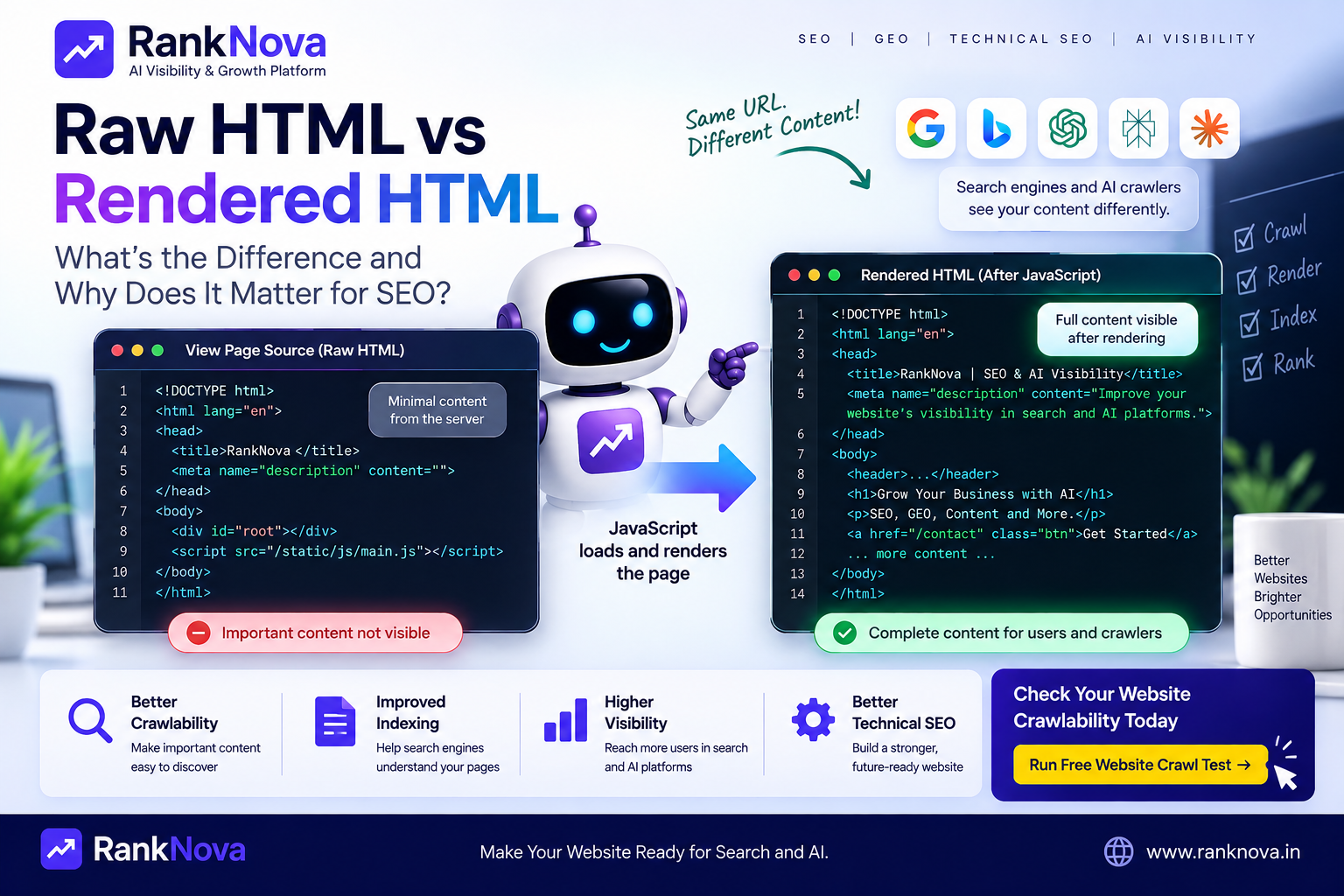
Raw HTML vs Rendered HTML: What’s the Difference and Why Does It Matter for SEO?
When you open a webpage in your browser, what you see on the screen is not always the same HTML that the server originally sent.
This difference is especially important for modern websites built with JavaScript frameworks such as React, Next.js, Angular, and Vue.
A page may have very little content in its initial HTML but display complete content after JavaScript runs.
For users, everything may look perfectly normal.
For search engines and other crawlers, however, the difference between raw HTML and rendered HTML can matter for crawling, content discovery, internal links, and indexing.
In this guide, we'll explain raw HTML vs rendered HTML, how Google handles JavaScript, the difference between server-side and client-side rendering, and what website owners and developers should check for better technical SEO.
What Is Raw HTML?
Raw HTML is the HTML document returned by the server when a browser or crawler requests a URL.
For example, imagine your server returns:
<html>
<head>
  <title>SEO Audit Services</title>
</head>
<body>
  <h1>SEO Audit Services</h1>
  <p>Improve your website's technical SEO.</p>
</body>
</html>
The important content is already present in the server response.
A crawler receiving this response can immediately find the title, heading, paragraph, and other HTML elements without needing JavaScript to create them.
You can often inspect the initial HTML in a browser using View Page Source.
What Is Rendered HTML?
Rendered HTML is the DOM produced after the browser processes the initial document and executes JavaScript that may modify the page.
For example, the server might initially return:
<div id="app"></div>
<script src="app.js"></script>
JavaScript then runs and creates:
<div id="app">
  <h1>SEO Audit Services</h1>
  <p>Improve your website's technical SEO.</p>
  <a href="/contact">Get an SEO Audit</a>
</div>
The user sees the complete page, but much of that content was not available in the original HTML response.
That final DOM is what we commonly mean when discussing rendered HTML in JavaScript SEO.
Raw HTML vs Rendered HTML
Here is the simplest difference:
Raw HTML = what the server initially sends.
Rendered HTML = what exists after the browser processes the page and JavaScript executes.
Factor Raw HTML Rendered HTML Generated by Server Browser/rendering environment JavaScript executed No Usually yes Visible using View Source Yes Not necessarily Dynamic content included Only if server generated Usually Represents initial response Yes No Represents final DOM Not necessarily Yes Understanding this difference becomes particularly important when JavaScript generates important SEO content.
Raw HTML vs Parsed HTML vs Rendered HTML
These terms are sometimes used interchangeably, but they are not exactly the same.
Raw HTML
The original HTML response returned by the server.
Parsed HTML
The browser parses the HTML document and converts it into a DOM structure.
Parsing does not necessarily mean that all JavaScript-generated content has been created.
Rendered HTML
The page state after processing and JavaScript execution have produced the content available in the DOM.
For practical JavaScript SEO analysis, raw HTML vs rendered HTML is usually the more useful comparison.
Why Does This Matter for SEO?
Search engines need to discover and understand your content before it can be considered for indexing and ranking.
If critical information only appears after JavaScript execution, crawling and rendering become more complicated than when the same information exists directly in the server response.
Important SEO elements can include:
- Page title
- Meta description
- H1
- Main page content
- Product descriptions
- Prices
- Internal links
- Canonical tags
- Structured data
- Pagination links
- Breadcrumbs
If these elements are missing from the initial HTML and depend entirely on JavaScript, you should test whether crawlers can reliably discover the final content.
How Does Google Handle JavaScript?
Google can process JavaScript and render many modern websites.
However, crawling and rendering should not be treated as exactly the same operation.
A crawler first needs to discover and fetch a URL. JavaScript-heavy pages may then require additional processing to produce the rendered page.
This is one reason Google recommends server-side rendering, static rendering, or hydration approaches as useful solutions for many JavaScript websites when appropriate.
The practical lesson is simple:
Do not assume that because content appears in your browser, every crawler necessarily receives or processes it in exactly the same way.
Example: JavaScript Content Problem
Imagine an e-commerce product page.
The raw HTML contains:
<div id="product"></div>
After JavaScript executes, it becomes:
<div id="product">
  <h1>Wireless Headphones</h1>
  <p>Premium noise-cancelling wireless headphones.</p>
  <span>₹4,999</span>
</div>
For a user with JavaScript enabled, there may be no obvious problem.
But important product information is dependent on JavaScript execution.
If rendering fails for a crawler, the useful content may be unavailable.
Internal Links Can Have the Same Problem
Content is not the only concern.
Suppose JavaScript creates your navigation links only after an API request completes.
Raw HTML:
<nav></nav>
Rendered HTML:
<nav>
  <a href="/services">Services</a>
  <a href="/pricing">Pricing</a>
  <a href="/blog">Blog</a>
</nav>
Those links help crawlers discover your website structure.
When important links depend entirely on JavaScript, you should verify that crawlers can discover them correctly.
Use real <a href="..."> links for crawlable navigation rather than relying on JavaScript click handlers alone.
View Source vs Inspect Element
This is an easy way to understand raw vs rendered HTML.
View Page Source
View Source generally shows the HTML response originally delivered for the document.
Inspect Element
Browser developer tools show the current DOM, which may have been modified by JavaScript.
That means you can sometimes see a heading in Inspect Element that does not exist in View Source.
This is not automatically an SEO problem.
But if important content exists only after JavaScript runs, it is worth testing how search engines process the page.
Client-Side Rendering (CSR)
Client-side rendering means much of the page is constructed in the browser using JavaScript.
A simplified response might contain:
<div id="root"></div>
<script src="bundle.js"></script>
The browser downloads the JavaScript, executes it, possibly requests data from APIs, and then builds the page.
Advantages of CSR
- Rich interactive experiences
- Smooth application-style navigation
- Clear separation between frontend and APIs
SEO Considerations
- Important content may not exist in initial HTML
- Crawlers may need JavaScript rendering
- Internal links can be harder to discover if implemented incorrectly
- Rendering failures can hide content
- Social/link preview metadata needs careful handling
CSR is not automatically bad for SEO, but it requires careful implementation and testing.
Server-Side Rendering (SSR)
Server-side rendering generates page HTML on the server before returning it to the browser.
Instead of sending an almost empty application shell, the server can return useful page content immediately.
For example:
<h1>Technical SEO Audit</h1>
<p>Find crawlability and indexing issues affecting your website.</p>
JavaScript can then hydrate the page and add interactivity.
SEO Advantages of SSR
- Important content is available in initial HTML
- Crawlers can discover content immediately
- Internal links can be exposed directly
- Metadata can be generated server-side
- Less dependence on client-side rendering for initial content
SSR is therefore commonly used for SEO-sensitive websites and pages.
Static Site Generation (SSG)
Static Site Generation creates HTML ahead of time, usually during the build process.
When someone requests the page, the server or CDN can return pre-generated HTML.
SSG works particularly well for content that does not need to change for every request.
Examples include:
- Blog posts
- Documentation
- Marketing pages
- Landing pages
- Help content
For SEO, SSG can provide complete HTML without requiring client-side JavaScript to generate the primary content.
What About Next.js?
Next.js supports multiple rendering strategies depending on the application architecture and version.
This makes it possible to serve important content from the server while still providing interactive React experiences.
For an SEO-focused Next.js website, developers should verify that critical content and metadata are available in the server-generated response when appropriate.
Do not assume that using Next.js automatically makes every page SEO-friendly.
The implementation still matters.
What About Angular and React?
React and Angular can both build search-friendly websites, but client-side-only implementations require more attention to rendering.
If important pages depend entirely on JavaScript to create their content, test what crawlers actually receive and render.
For public SEO pages, consider rendering strategies that make essential content available without requiring unnecessary client-side work.
Which Is Better for SEO: Raw HTML or Rendered HTML?
This question needs some nuance.
Search engines such as Google can render JavaScript, so JavaScript-generated content is not automatically invisible.
However, from a technical SEO perspective, making important content available in the initial server response generally reduces dependency on JavaScript rendering.
For critical SEO content, it is often beneficial to expose elements such as:
- H1 headings
- Main text
- Internal links
- Canonical information
- Structured data where appropriate
- Product information
- Article content
in server-generated or statically generated HTML.
JavaScript can then enhance the experience rather than being the only way the page becomes meaningful.
Does Google See the Same Page as Users?
Not always.
Users generally browse with modern browsers that execute JavaScript and load resources interactively.
Search crawlers operate differently and may process pages on different schedules or under different technical conditions.
That is why testing only what appears visually in Chrome is not enough for technical SEO.
You should also investigate what the server returns and what crawlers can access.
How to Compare Raw and Rendered HTML
You can perform a basic comparison manually.
Step 1: Open View Source
Open your page and use View Page Source.
Search for your:
- H1
- Main paragraph
- Important internal links
- Product name
- Canonical URL
- Structured data
Step 2: Open Developer Tools
Right-click the page and choose Inspect.
Search for the same elements in the DOM.
Step 3: Compare the Results
If something exists in Inspect but not View Source, JavaScript may be generating or modifying it.
That does not automatically mean you have an SEO problem.
But the more important the element is, the more reason you have to verify crawler behavior.
Use Google Search Console URL Inspection
Google Search Console can help you inspect how Google sees a specific URL.
For important pages, review information such as:
- Whether Google can access the URL
- Crawl status
- Indexing status
- Canonical information
- Page resources and rendered output where available
This can help identify differences between what your browser shows and what Google processes.
Common JavaScript SEO Problems
1. Main Content Only Loads After an API Request
If an API request fails or rendering is delayed, crawlers may receive an incomplete page.
2. Internal Links Use Only Click Handlers
Avoid navigation that relies exclusively on JavaScript such as clickable <div> elements.
Use proper anchor elements with valid href attributes for crawlable navigation.
3. Metadata Is Added Only Client-Side
Important page metadata should be implemented in a way that crawlers and sharing platforms can reliably access.
4. Content Requires User Interaction
Important SEO content should not require a user to click a button, scroll, or perform another interaction before it becomes available to crawlers.
5. JavaScript Errors Break Rendering
A runtime error can prevent important components from loading.
Monitor JavaScript errors on production pages.
6. API Is Blocked or Unavailable
If page content depends on APIs that crawlers cannot access or that frequently fail, rendered content may be incomplete.
7. Slow JavaScript Execution
Large JavaScript bundles can hurt performance and make pages more expensive to process.
Optimize scripts and avoid shipping unnecessary JavaScript.
Does JavaScript SEO Matter for AI Crawlers?
Yes, but crawler capabilities vary.
You should not assume that every search engine, AI crawler, social crawler, or other automated system executes JavaScript like a full browser.
If important public information is available directly in the HTML response, it is easier for a wider range of crawlers to access and understand it.
This can matter as businesses increasingly care about visibility beyond traditional search engines.
For important public content, robust server-generated HTML can therefore support both traditional SEO and broader machine accessibility.
Raw HTML and AI Search Visibility
AI search introduces another reason to pay attention to technical accessibility.
Your website may contain excellent information, but systems still need a reliable way to discover and process that information.
Important public content such as:
- Business description
- Services
- Product information
- FAQs
- Blog articles
- Case studies
- Contact information
should be technically accessible and clearly structured.
Strong HTML structure, semantic headings, internal links, and crawlable content provide a better foundation for both SEO and AI visibility.
Technical SEO Checklist for JavaScript Websites
Use this checklist when auditing a JavaScript-heavy website:
- Check raw HTML
- Check rendered DOM
- Verify H1 and primary content
- Verify internal links
- Check title and metadata
- Check canonical tags
- Review robots.txt
- Review sitemap
- Test Googlebot access
- Check HTTP status codes
- Monitor JavaScript errors
- Check API dependencies
- Test important pages without JavaScript where useful
- Review server-side rendering options
- Check Core Web Vitals
- Test mobile pages
The goal is not to remove JavaScript.
The goal is to make sure JavaScript does not unnecessarily prevent important content from being discovered and processed.
Should Every Website Use Server-Side Rendering?
No.
Rendering architecture should depend on the application.
For example, a private dashboard that requires authentication has very different SEO requirements from a public product page.
CSR can be perfectly appropriate for application interfaces that do not need search visibility.
For public pages that depend heavily on organic discovery, SSR or static generation can often simplify search engine access to primary content.
Choose the architecture based on the purpose of the page rather than applying one rendering strategy to the entire application.
Check Whether Crawlers Can Access Your Website
Rendering is only one part of technical SEO.
Before worrying about advanced JavaScript SEO, make sure crawlers can reach your website in the first place.
Check:
- Robots.txt
- Sitemap
- HTTP status codes
- Googlebot access
- AI crawler access
- Indexability
- Redirects
- Server availability
RankNova's free Website Crawl Test can help you check important crawlability and technical SEO signals.
Run the test here:
https://www.ranknova.in/website-crawl-test
Best Practices for Raw and Rendered HTML
For important SEO pages:
- Make primary content accessible without unnecessary rendering dependencies.
- Use proper HTML links with
hrefattributes. - Generate important metadata reliably.
- Use semantic HTML and logical heading structure.
- Avoid hiding critical content behind user interaction.
- Monitor JavaScript errors.
- Keep JavaScript bundles efficient.
- Test raw HTML and rendered DOM separately.
- Check important URLs using Google Search Console.
- Test crawlability after major frontend deployments.
Final Thoughts
Raw HTML and rendered HTML are not competitors. They are different stages of how a modern webpage is delivered and processed.
Raw HTML is what the server initially returns.
Rendered HTML is what exists after the page has been processed and JavaScript has executed.
Google can process JavaScript, but relying unnecessarily on client-side rendering for critical SEO content can introduce additional complexity.
For public pages that depend on organic search, make important content easy for crawlers to discover and understand.
Use JavaScript to enhance your website experience rather than making basic content accessibility unnecessarily dependent on it.
And remember that what you see in your browser is not always what a crawler initially receives.
Test Your Website with RankNova
Want to know whether search engines and AI crawlers can access your website?
Use RankNova's free Website Crawl Test to check robots.txt, sitemap availability, crawler access, indexability signals, and technical SEO issues.
FAQ
Frequently Asked Questions
Quick answers pulled directly from this article for easier reading and better sharing previews.
What is the difference between raw HTML and rendered HTML?
Raw HTML is the original HTML response returned by the server. Rendered HTML refers to the DOM after the browser has processed the page and JavaScript has executed and potentially modified or added content.
Is raw HTML better than rendered HTML for SEO?
Google can render JavaScript, so rendered content is not automatically bad for SEO. However, providing important content in server-generated HTML can reduce dependence on JavaScript rendering and make critical information easier for crawlers to access.
Can Google crawl JavaScript websites?
Google can crawl and render many JavaScript websites. Developers should still test important content, internal links, metadata, resources, and rendering behavior rather than assuming everything visible to users is processed identically by crawlers.
What is the difference between View Source and Inspect Element?
View Source generally shows the HTML originally returned for the document, while Inspect Element shows the current DOM, which may include content created or modified by JavaScript.
Is client-side rendering bad for SEO?
Client-side rendering is not automatically bad for SEO, but it makes important content more dependent on JavaScript execution. Public SEO pages should be tested carefully to ensure crawlers can discover their content and links.
Is Next.js good for SEO?
Next.js can support SEO-friendly rendering strategies such as server rendering and static generation. SEO performance still depends on how the application is implemented, including metadata, links, content, canonicalization, and crawlability.
Do AI crawlers render JavaScript?
Crawler capabilities vary, so website owners should not assume every AI or search crawler executes JavaScript like a modern browser. Making important public information accessible in the initial HTML can improve technical accessibility.
How can I test whether crawlers can access my website?
Check robots.txt, sitemap availability, HTTP responses, raw HTML, rendered HTML, Google Search Console, and crawler access. RankNova's Website Crawl Test can also help identify important crawlability and indexability signals.