How to Fix Robots.txt and Sitemap Issues for Better SEO
Robots.txt and sitemap files are two small but powerful parts of technical SEO.
If they are configured correctly, they help search engines discover, crawl, and understand your website.
If they are configured incorrectly, they can block important pages, slow down indexing, confuse crawlers, and reduce your SEO visibility.
Many websites lose organic traffic because of simple robots.txt or sitemap mistakes that are easy to fix.
In this guide, we will explain how robots.txt and sitemap files work, common issues to check, and how to fix them for better SEO and AI visibility.
What Is Robots.txt?
Robots.txt is a file that tells crawlers which parts of your website they can or cannot access.
It is usually found at:
https://yourdomain.com/robots.txt
Search engine crawlers like Googlebot and Bingbot check this file before crawling your website.
A simple robots.txt file may look like this:
User-agent: *
Disallow: /admin/
Sitemap: https://yourdomain.com/sitemap.xml
This tells all crawlers not to crawl the /admin/ section and also gives them the sitemap location.
What Is a Sitemap?
A sitemap is a file that lists important URLs on your website.
It helps search engines discover your important pages faster.
A sitemap is usually found at:
https://yourdomain.com/sitemap.xml
Your sitemap should include important live URLs such as:
- Homepage
- Service pages
- Product pages
- Category pages
- Blog posts
- Case studies
- Location pages
- Important landing pages
A sitemap does not guarantee indexing, but it helps search engines understand your website structure.
Why Robots.txt and Sitemap Matter for SEO
Google needs to crawl your website before it can understand and rank your pages.
Robots.txt helps control crawler access.
Sitemap helps crawlers discover important pages.
Together, they affect:
- Crawlability
- Page discovery
- Indexing speed
- Technical SEO health
- Website structure understanding
- AI crawler access
- Search visibility
If your robots.txt blocks important pages or your sitemap contains broken URLs, your SEO performance can suffer.
Common Robots.txt Issues and How to Fix Them
Here are the most common robots.txt problems and how to solve them.
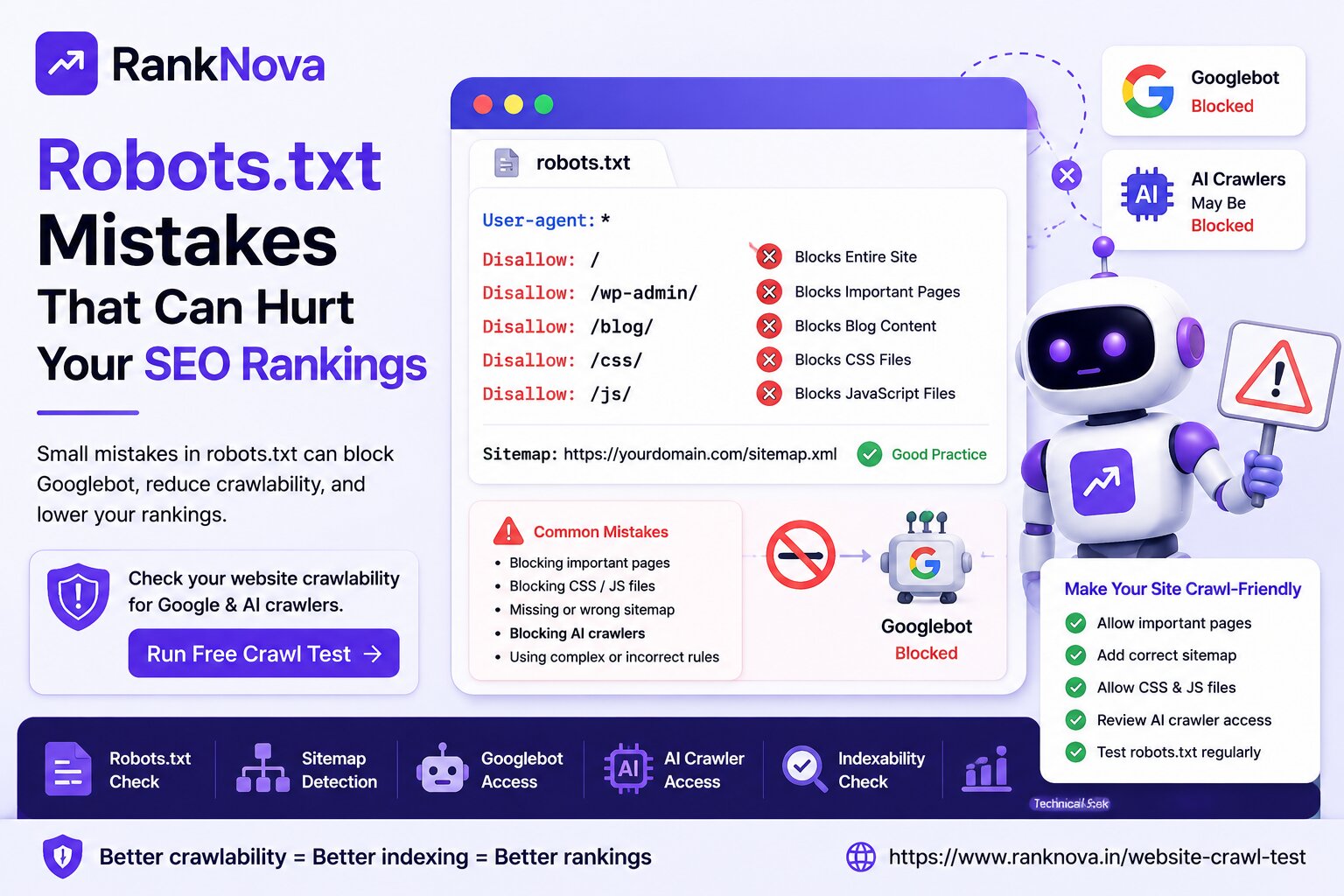
1. Entire Website Is Blocked
This is one of the most dangerous robots.txt mistakes.
Problem:
User-agent: *
Disallow: /
This tells all crawlers not to crawl your entire website.
This rule is sometimes used on staging websites during development. But if it is accidentally pushed to the live website, Googlebot may not crawl your site properly.
Fix:
Remove the full-site block from the live website.
A safer basic setup can be:
User-agent: *
Disallow: /admin/
Disallow: /login/
Sitemap: https://yourdomain.com/sitemap.xml
After fixing it, test important pages again.
2. Important Pages Are Blocked
Problem:
Your robots.txt may block important folders such as:
Disallow: /services/
Disallow: /blog/
Disallow: /products/
This can stop Googlebot from crawling service pages, blogs, or product pages.
Fix:
Remove rules that block important public pages.
Important SEO pages should usually be crawlable:
- Homepage
- Service pages
- Blog posts
- Product pages
- Category pages
- Case studies
- FAQs
- Contact page
Only block pages that do not need search visibility.
3. CSS and JavaScript Files Are Blocked
Problem:
Modern websites often need CSS and JavaScript to display content properly.
If robots.txt blocks these resources, Google may not render your pages correctly.
Example:
Disallow: /css/
Disallow: /js/
Disallow: /assets/
Fix:
Allow important CSS, JavaScript, and asset files that are required for page rendering.
Google should be able to see your website similar to how users see it.
4. Sitemap Is Missing from Robots.txt
Problem:
Your robots.txt file does not include your sitemap URL.
This is not always a critical error, but adding the sitemap helps crawlers find your important URLs.
Fix:
Add this line to robots.txt:
Sitemap: https://yourdomain.com/sitemap.xml
Make sure the sitemap URL is correct and returns a valid response.
5. Wrong Sitemap URL in Robots.txt
Problem:
Your robots.txt points to an old or broken sitemap.
Example:
Sitemap: https://yourdomain.com/old-sitemap.xml
If that file returns 404 or contains old URLs, crawlers may get wrong signals.
Fix:
Update robots.txt with the correct sitemap URL.
Then open the sitemap in your browser and confirm that it loads properly.
6. AI Crawlers Are Blocked by Mistake
Problem:
AI search is becoming important for brand discovery.
Your robots.txt may block AI-related crawlers without a clear strategy.
Some AI-related crawlers include:
- GPTBot
- ChatGPT-User
- ClaudeBot
- PerplexityBot
- Google-Extended
- Bingbot
Fix:
Review your business goal.
If your public content should be discoverable in AI search, make sure important pages are not accidentally blocked for relevant crawlers.
Private areas like admin, login, checkout, and dashboards should still remain blocked.
7. Robots.txt Rules Are Too Complex
Problem:
Some websites have too many allow and disallow rules, making the file hard to manage.
This can create accidental crawl blocks.
Fix:
Keep robots.txt simple and intentional.
For most business websites, robots.txt should block only private or unnecessary areas, not important SEO pages.
Common Sitemap Issues and How to Fix Them
Now let’s look at common sitemap problems.
1. Sitemap Is Missing
Problem:
Your website does not have a sitemap, or it is not accessible.
Fix:
Create a sitemap and place it at a standard URL like:
https://yourdomain.com/sitemap.xml
Most CMS platforms and frameworks can generate sitemaps automatically.
After creating it, add it to robots.txt and submit it in Google Search Console.
2. Sitemap Contains Broken URLs
Problem:
Your sitemap includes URLs that return 404 or other errors.
This wastes crawl resources and creates poor signals.
Fix:
Remove broken URLs from the sitemap.
Only include live URLs that return 200 status codes.
3. Sitemap Contains Redirected URLs
Problem:
Your sitemap includes URLs that redirect to other pages.
Example:
https://yourdomain.com/old-page
redirects to:
https://yourdomain.com/new-page
Fix:
Update the sitemap to include the final destination URL, not the old redirected URL.
Your sitemap should contain clean, final, canonical URLs.
4. Sitemap Contains Noindex Pages
Problem:
Your sitemap includes pages that have a noindex tag.
This sends mixed signals.
The sitemap says, “This page is important.”
The noindex tag says, “Do not index this page.”
Fix:
Remove noindex pages from the sitemap.
Only include pages that you want search engines to crawl and index.
5. Sitemap Contains Duplicate or Non-Canonical URLs
Problem:
Your sitemap may contain duplicate versions of URLs, such as:
- HTTP and HTTPS versions
- WWW and non-WWW versions
- URLs with tracking parameters
- Filter URLs
- Non-canonical pages
Fix:
Use only canonical URLs in your sitemap.
Make sure your sitemap matches your preferred website version.
For example, use only:
https://www.yourdomain.com/page
or only:
https://yourdomain.com/page
depending on your canonical setup.
6. Sitemap Is Too Large or Not Split Correctly
Problem:
Large websites may have too many URLs in one sitemap.
Fix:
Use sitemap index files and split large sitemaps by content type.
For example:
post-sitemap.xmlpage-sitemap.xmlproduct-sitemap.xmlcategory-sitemap.xml
This makes sitemap management easier.
7. Sitemap Is Not Submitted in Google Search Console
Problem:
Your sitemap exists, but Google has not been directly informed about it.
Fix:
Submit your sitemap in Google Search Console.
Steps:
- Open Google Search Console
- Select your property
- Go to Sitemaps
- Enter your sitemap URL
- Click Submit
This helps Google discover your sitemap faster.
Best Practice Robots.txt Example
For a normal business website, a simple robots.txt file may look like this:
User-agent: *
Disallow: /admin/
Disallow: /login/
Disallow: /checkout/
Sitemap: https://yourdomain.com/sitemap.xml
This allows crawlers to access public pages while blocking private or unnecessary sections.
Your actual rules may be different depending on your website type.
Best Practice Sitemap Checklist
Your sitemap should:
- Be accessible at a clean URL
- Return 200 status code
- Include important live pages
- Exclude noindex pages
- Exclude broken pages
- Exclude redirected URLs
- Exclude duplicate URLs
- Use canonical URLs
- Be updated automatically
- Be submitted in Google Search Console
- Be added inside robots.txt
How Robots.txt and Sitemap Affect AI Visibility
Search is changing with AI-powered platforms and answer engines.
Businesses now need to think about both SEO and GEO.
SEO helps your website rank on search engines.
GEO helps your brand appear in AI-generated answers.
Robots.txt and sitemap files support both by helping crawlers access and understand your public content.
If AI crawlers cannot access your content, your AI visibility may be limited.
If your sitemap does not include important pages, crawlers may miss useful content that explains your brand, services, and expertise.
How to Check Robots.txt and Sitemap Issues
You can manually check:
https://yourdomain.com/robots.txthttps://yourdomain.com/sitemap.xml- Google Search Console sitemap status
- Google Search Console indexing reports
- Important page status codes
- Meta robots tags
- Canonical tags
- Internal links
- AI crawler rules
Manual checks are useful, but they can take time.
That is why RankNova offers a free Website Crawl Test.
Use RankNova’s Free Website Crawl Test
RankNova’s Website Crawl Test helps you quickly check whether your website has crawlability and indexing risks.
It can help identify:
- Robots.txt availability
- Sitemap detection
- Googlebot access
- Bingbot access
- AI crawler access
- Indexability signals
- Technical SEO warnings
- Crawl blocking risks
You can test your website here:
https://www.ranknova.in/website-crawl-test
Quick Fix Checklist
Use this quick checklist:
- Remove accidental
Disallow: /from live website - Allow important service, blog, product, and category pages
- Add correct sitemap URL inside robots.txt
- Remove broken URLs from sitemap
- Remove redirected URLs from sitemap
- Remove noindex pages from sitemap
- Use only canonical URLs in sitemap
- Allow important CSS and JavaScript files
- Review AI crawler access intentionally
- Submit sitemap in Google Search Console
- Test your website after every robots.txt or sitemap change
Final Thoughts
Robots.txt and sitemap issues are common, but they are also fixable.
A wrong robots.txt rule can block your most important pages.
A poor sitemap can slow discovery and create confusing signals for search engines.
For better SEO performance, your website should have a clean robots.txt file, an accurate sitemap, crawlable public pages, and clear indexability signals.
In the AI search era, these technical foundations also support AI visibility and GEO.
Check Robots.txt and Sitemap Issues with RankNova
Want to know if your website is blocking Google or AI crawlers?
Run a free Website Crawl Test with RankNova.
Check robots.txt, sitemap, Googlebot access, AI crawler access, indexability signals, and technical SEO risks in seconds.
FAQ
Frequently Asked Questions
Quick answers pulled directly from this article for easier reading and better sharing previews.
How do I fix robots.txt issues?
Fix robots.txt issues by removing accidental full-site blocks, allowing important public pages, adding the correct sitemap URL, avoiding unnecessary complex rules, and testing crawler access after every change.
How do I fix sitemap issues?
Fix sitemap issues by removing broken, redirected, duplicate, noindex, and non-canonical URLs. Your sitemap should include only important live pages that return 200 status codes.
Should sitemap be added in robots.txt?
Yes, adding the sitemap URL in robots.txt is a good practice because it helps crawlers discover your important website pages more easily.
Can robots.txt block Google from crawling my website?
Yes, robots.txt can block Googlebot from crawling specific pages, folders, or even the entire website if the rules are configured incorrectly.
Why should noindex pages be removed from sitemap?
Noindex pages should be removed from sitemap because the sitemap tells search engines a page is important, while noindex tells them not to show it in search results. This creates mixed signals.
How can RankNova help with robots.txt and sitemap issues?
RankNova’s Website Crawl Test helps check robots.txt availability, sitemap detection, Googlebot access, Bingbot access, AI crawler access, indexability signals, and technical SEO warnings.